Alert Monitoring

Build a Response Plan to Fit Any Team Structure

From your own managers to 24/7 professional monitoring, SolusGuard gives you the flexibility to decide how your team responds to every alert.

Response Options

Choose the Response That Fits Your Workforce

Whether alerts are handled by your managers, our 24/7 monitoring team, or your internal response team, everyone works from the same alert feed.

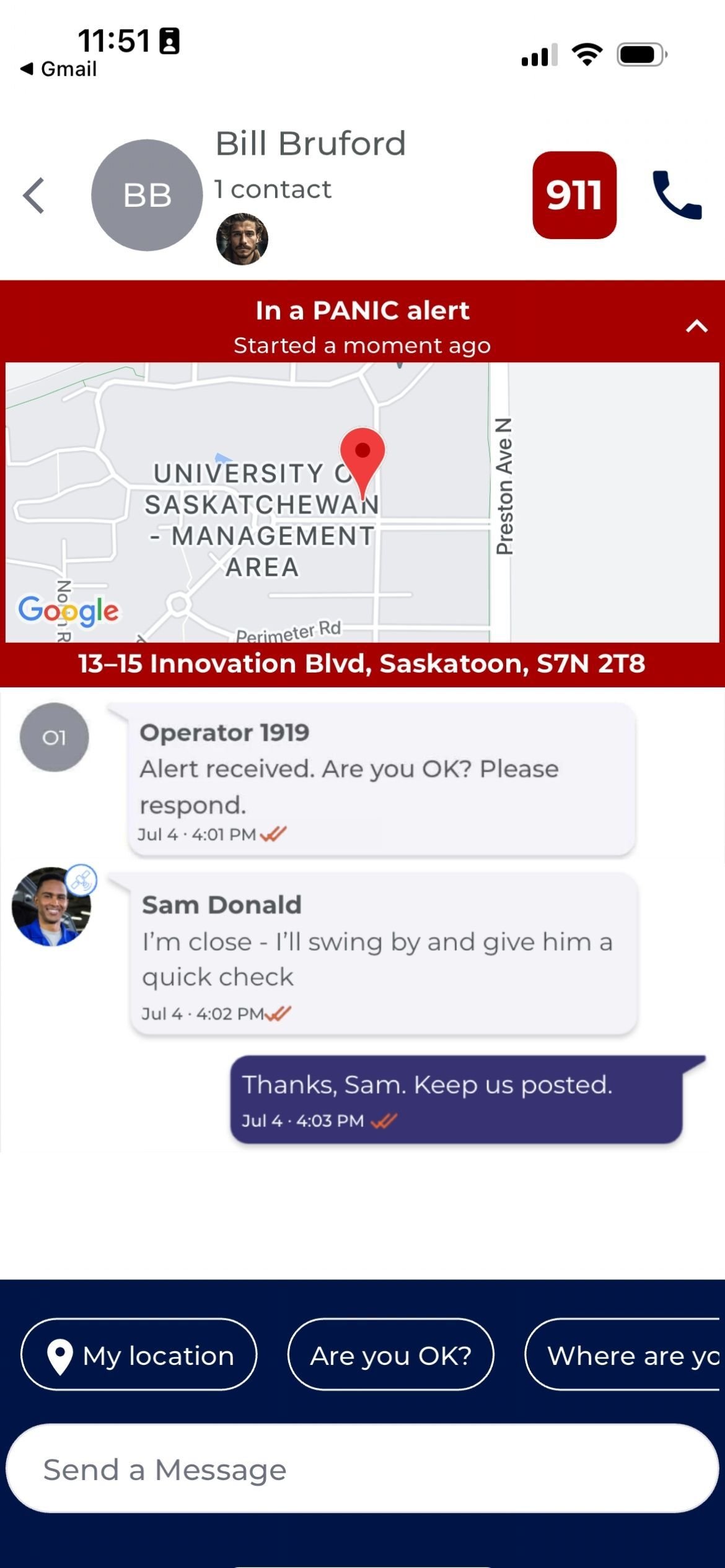
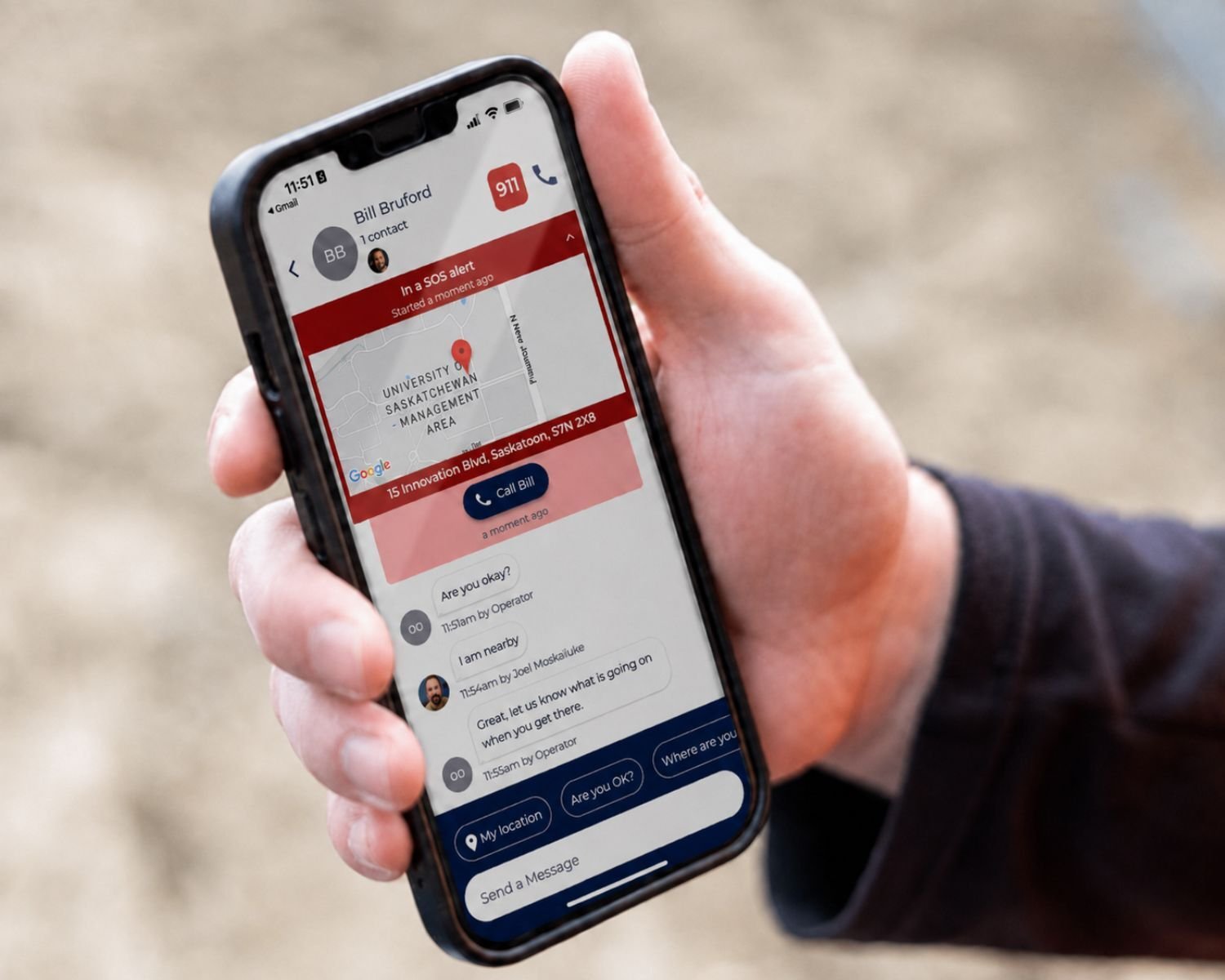
A manager holding a phone showing an active SOS alert with the location map and team messages

Mobile Monitoring

Managers can receive and respond to alerts directly from their phone, or follow the response in real time.

  • Live location when an alert is triggered
  • One shared feed for everyone involved
  • No additional equipment required
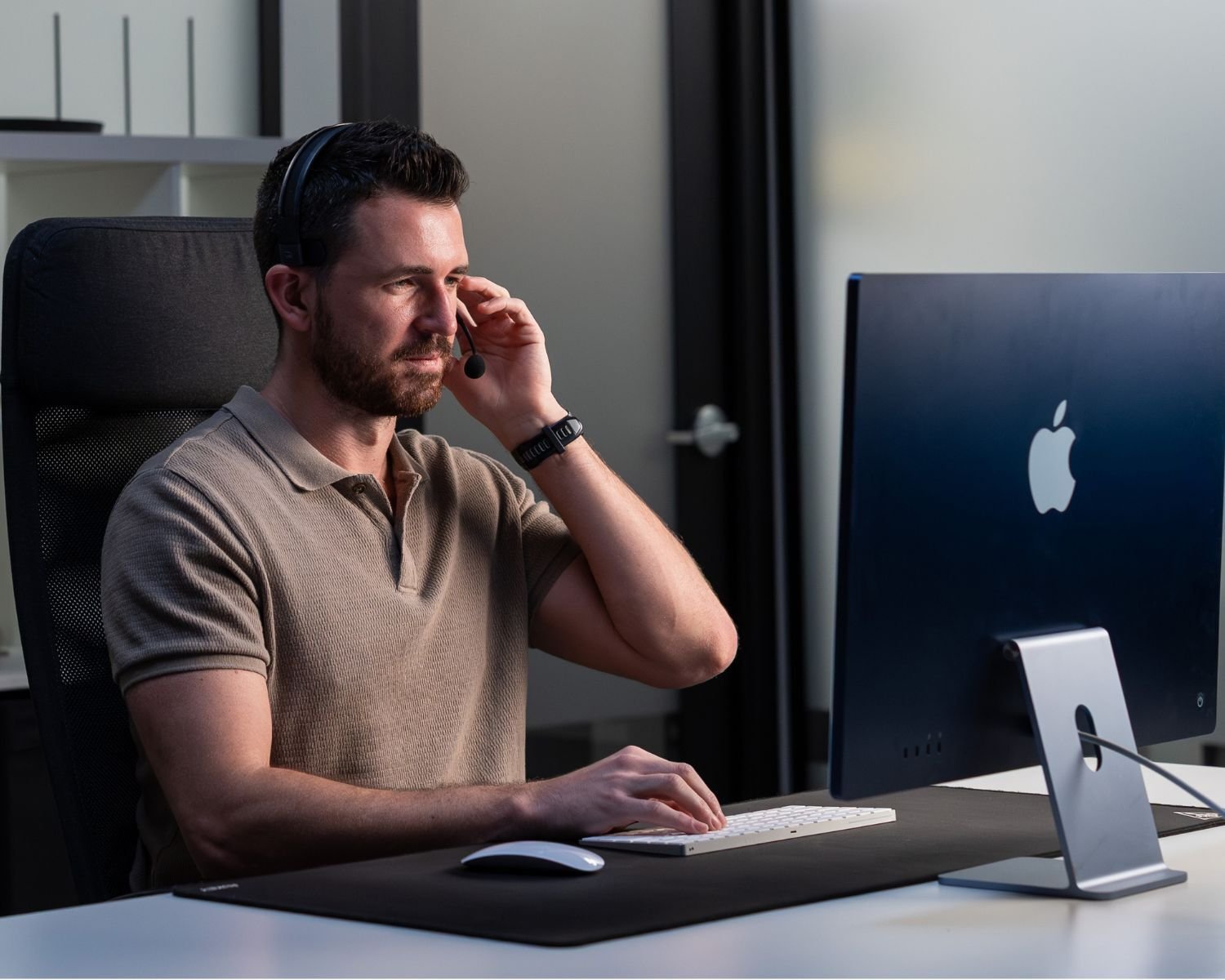
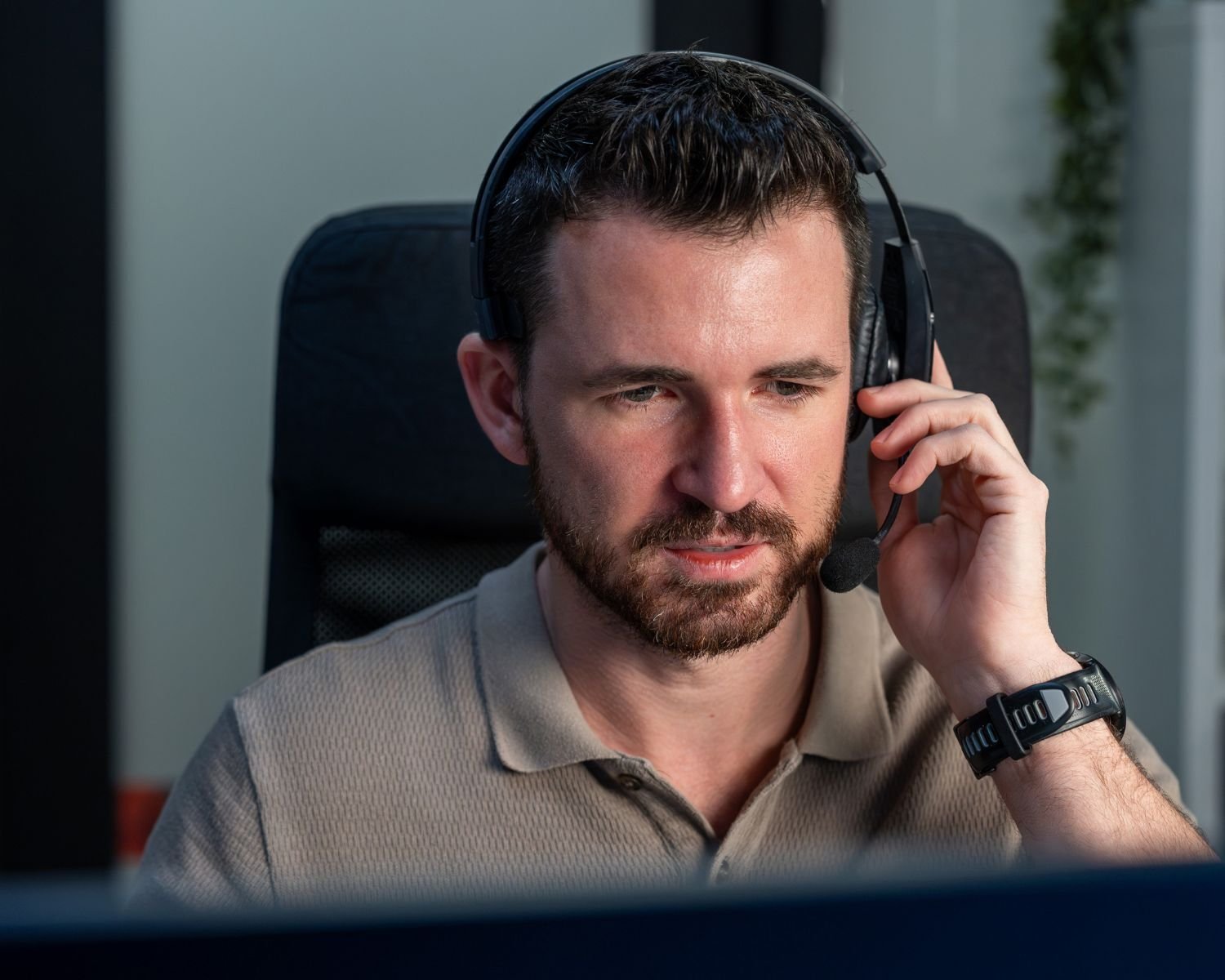
A SolusGuard monitoring agent wearing a headset, working an alert at their station

24/7 Professional Monitoring

Our monitoring agents respond within seconds and follow your escalation protocols, so every alert gets a response.

  • Live agents available 24/7
  • Your escalation protocols, followed every time
  • Every action visible in the shared feed
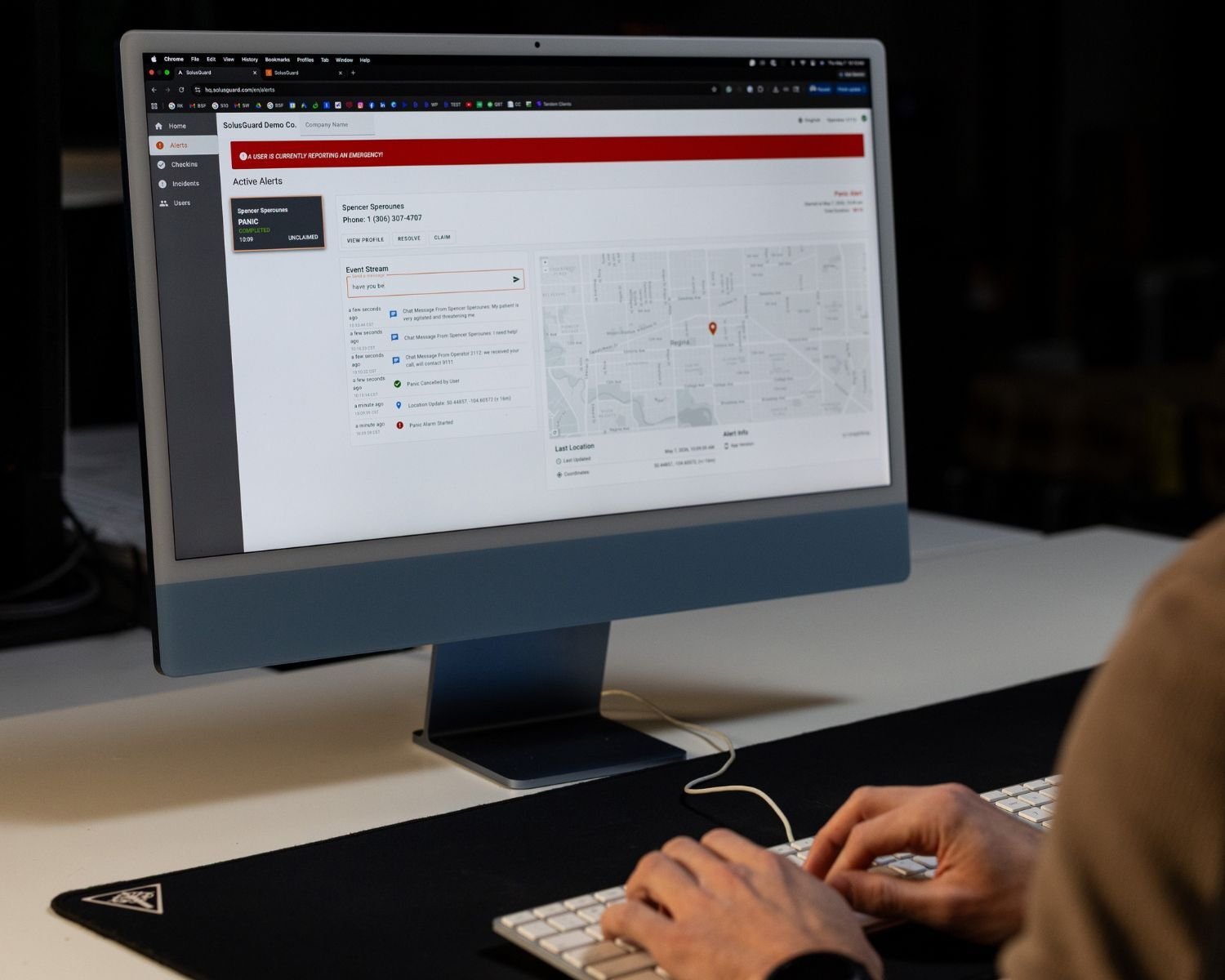
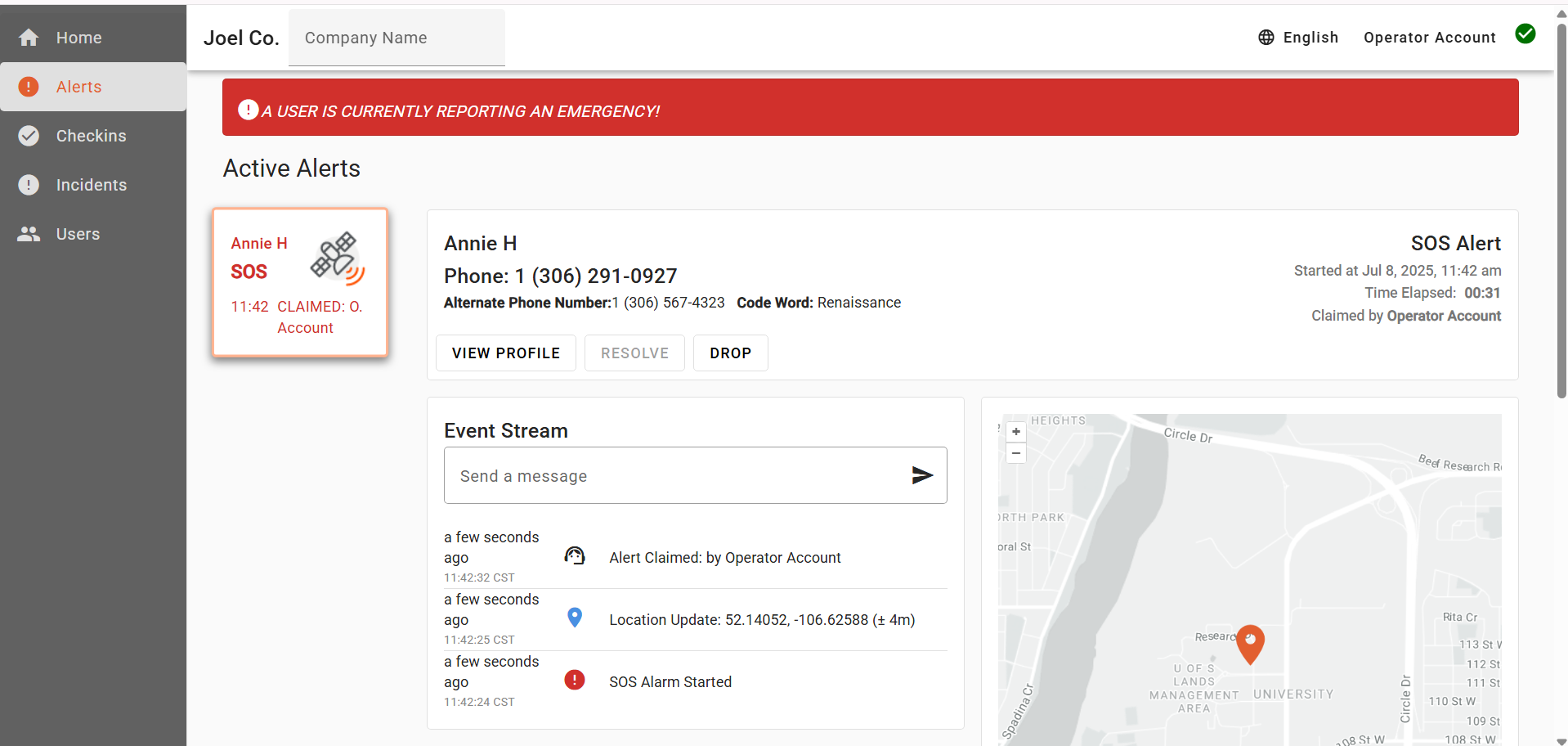
An operator at a desktop running Command Center, with the active alert queue, event stream, and location map on screen

Your Command Center

Give your internal security or response team the tools to manage alerts directly.

  • One live queue for every alert
  • Claim, escalate and hand off alerts
  • Every action visible in the shared feed
See each one in detail

Mobile Monitoring

Manage Alerts Right From Your Phone

When an alert is triggered, your team sees the employee's location, relevant context and response activity in one shared feed. They can coordinate the response from wherever they are, following your established protocols.

Alert feed showing the employee's emergency contacts, the alert type, live location, a monitoring agent message, a coworker offering to respond, and the check-in details behind the alert
Alert Details
Check-in ACTIVE
Started timeJul 4 · 3:42 PM
Level of RiskMedium
Job TypeParolee home visit
Notes:
Mark seemed really jumpy last couple meetings

Each employee can have their own emergency contacts, so alerts reach the people best positioned to respond. Add as many contacts as needed at no extra cost.

Responders can immediately see whether it's a panic alert, in-app SOS, detected fall or missed check-in, so they have context before they respond.

Location is shared automatically when an alert is triggered and updates as the employee moves, so responders know where to send help.

Information entered at the start of a check-in appears with the alert, giving responders important context about the employee's work, location or situation.

Add 24/7 professional monitoring and your team can see the monitoring agent's actions and updates in real time, right alongside their own.

Everyone in the employee's emergency network can see updates, share information and coordinate the response together in real time.

Every location, message and action is timestamped and logged in the Compliance Dashboard for a complete record of the response.

24/7 Professional Monitoring

A Call for Help Should Never Go Unanswered

Our monitoring agents are available around the clock to respond to alerts and follow your established protocols.

A SolusGuard monitoring agent wearing a headset, working an alert at their station

Live agents. Real response. Around the clock.

What Professional Monitoring Adds

  • Every Alert Gets a Response

    An agent claims the alert and immediately begins your established response protocol, staying with it until it's resolved.

  • Your Team Stays Informed

    Every action taken by the agent is visible in the shared feed, so your team can follow the response in real time.

  • Response Happens in Parallel

    The agent coordinates with your team and emergency contacts at the same time, eliminating the delays of a traditional call tree.

  • Responders Get the Information They Need

    When additional help is needed, the agent can provide responders with the location and relevant details already captured in the alert.

When Professional Monitoring Makes Sense

Your Workers' Hours Don't Match Your Office Hours

Night shifts and weekend emergency calls need someone available to answer them. The hours a worker is most alone are usually the hours your office is empty. We make sure those odd hour calls are never missed.

Your Team Is Busy

Your managers are between sites, on another call, or off shift, and an alert nobody sees is the same as no alert at all. Unless you have a dedicated team watching for alerts constantly, calls for help can get missed.

Your Managers Are Not Trained Emergency Responders

Knowing when to escalate and what to tell 911 is a trained judgment call, and the liability that rides on it is real. Our agents carry that piece, so your team can back up a response instead of owning it alone.

A Protocol Only Helps If It Is Followed Every Time

Under pressure, people improvise. Steps get skipped, the call goes out late, and no two alerts end up handled quite the same way. Our agents run your procedure in the same order every time, and log each step as they go.

Command Center

Bring Alert Monitoring In-House

Already have a security, dispatch or response team? Command Center gives them the same software used by our professional monitoring team to receive, manage and respond to alerts.

The Command Center dashboard showing an active SOS alert: the alert queue on the left, the worker's contact details and response actions in the centre, and the event stream and live location map below

When Command Center Is the Right Fit

You Already Have a Dedicated Response Team

If your security, dispatch or response team already monitors incidents, Command Center gives them the tools to manage lone worker alerts in-house.

You're Managing a Large Workforce

For organizations with employees across multiple teams, shifts or locations, Command Center provides one place to see, assign and manage every alert.

You Want to Reduce the Workload on Your Dispatch Team

Instead of calling or texting employees for every check-in, your team only steps in when an alert requires attention. Routine check-ins happen automatically, while Command Center keeps your team in control when they're needed.

Free Assessment

How Does Your Safety Program Measure Up?

Take a short assessment to get your personalized Report Card - the legislation that applies to you, and where your gaps are.

Get My Report Card

Takes 5 minutes. Completely confidential.

Customer Reviews

What Safety Teams Say About SolusGuard

SolusGuard - A customer review on an exceptional lone worker solution

Our overall experience has been excellent, with a reliable lone worker solution that significantly enhances the safety of our people. Combined with exceptional customer service and responsive support, the team has consistently exceeded our expectations.

John

Senior Vice President, HSSE in Canada

Real Estate, 1,001-5,000 Employees

Great Lone Worker App

The experience from introduction to implementation has been seamless. Training went great and our technicians acclimated to use quickly. They even have a decent template for policy.

Roger

Director of Safety and Compliance in US

Construction, 201-500 Employees

Peace of Mind with Exceptional Support

My overall experience reflects a Canadian service with heart and soul, where community safety and compassion support truly matters. We appreciate the professionalism, reliability and commitment to safety that SolusGuard demonstrates.

LinetteWe

Executive Director in Canada

Nonprofit Organization Management, 11-50 Employees

Solus Guard is a great solution to the challenge of working alone/isolation

The process has been very smooth throughout, including sales call, set-up and orientation, tech support, training and invoicing. Any questions that have arisen have been responded to personally and promptly.

Kisae

Operations Director in Canada

Nonprofit Organization Management, 51-200 Employees

Great solution for lone workers

We went from three applications into only using SolusGuard to simplify lone worker safety across our remote workforce. The mobile check-ins, SOS and monitoring were well received, the onboarding materials were easy to deploy, and the centralized reporting has given us much better oversight of worker safety activities.

Kristin

EHS Operations Manager in Canada

Oil & Energy, 5,001-10,000 Employees

Working alone solution for a challenging work environment

They were thorough in their set-up. Support has been excellent for on-boarding teams to the technology, and the staff feedback has been positive.

Robert

Director OHS in Canada

Hospital & Health Care, 1,001-5,000 Employees

Panic Button Technology Review

SolusGuard staff has been wonderful to work with, and the device is easy to use but effective. We also enjoy being able to communicate in the app with staff to ensure they are safe when necessary.

Megan

Deputy Director in US

Law Enforcement Software, 11-50 Employees

Probation Supervisor

I have been using it for the last 7 months and have had very few issues with it. It has ensured our officers safety while they are out in the field, and that is what is most important.

Larissa

Probation Supervisor in US

Judiciary, 11-50 Employees
FAQ

Frequently asked questions

Alert monitoring is how a safety alert from a worker in the field gets received, claimed, and answered. With SolusGuard, every alert - a missed check-in, an in-app SOS, a duress press, or a detected fall - opens a shared alert feed with live location and the context the worker set out with. You decide who answers it: your own managers from the mobile app, SolusGuard's 24/7 professional monitoring agents, or your internal response team in Command Center.

Most systems give you one response model. SolusGuard gives you three, all running on the same alert feed: mobile monitoring for supervisors who answer from the phone already in their pocket, 24/7 professional monitoring by live agents in North America, and Command Center, the dispatch-grade software for organizations that keep response in house. Choose one or combine them, and change the mix as your team changes.

Four types: missed check-ins, in-app SOS alerts, duress presses from a paired wearable panic button, and automatic fall detection. Each one opens the same shared feed, and the feed names the alert type the moment it opens so responders know what they are dealing with before reading a word of the thread.

Everyone in that worker's emergency network gets a push notification at the same moment, and the alert opens a shared alert feed with live location that keeps updating as they move. The check-in context they recorded on their way out - job type, level of risk, and any notes - opens with it, and the alert lands in your monitoring dashboards at the same time. If 24/7 professional monitoring is active, an agent claims it within seconds and begins your escalation protocol, with every action posting into that same feed.

No. Location is shared only when it is needed: while a check-in session is running, and during any alert. Outside those moments nothing is collected and there is no location for a manager to look at. Worker privacy matters, and the app is built to protect it.

The alert feed is a single shared thread showing real-time alert data, GPS location, the worker's check-in context, and every response action as it is taken. The worker, their emergency contacts, and anyone monitoring all see the same thread at the same time, so nobody calls around for a status update and nobody repeats information that is already there. The team can agree on who is going instead of waiting to be assigned.

It comes down to who can reliably answer, and when. The hours a worker is most alone are usually the hours your office is empty, and a manager between sites or off shift cannot answer an alert nobody has seen. Knowing when to escalate and what to tell 911 is also a trained judgment call. Our agents cover those gaps, run your procedure in the same order every time, and log each step, while your team still sees everything in the feed.

Yes. Alert thresholds, check-in intervals, the order an agent works through emergency contacts, how quickly they move to the next person, and when an alert is handed off - these are all yours to set. The initial alert is not sequential: it reaches everyone in that worker's emergency network at the same moment. Emergency networks are configured per user with unlimited contacts at no extra cost, so a field tech three hours out of town and an office manager downtown each get the people who can actually reach them.

Within seconds, every hour of the year. These are live agents in North America, not an answering service. One agent claims the alert and owns the response until it is resolved, working your protocol in the same order every time, and posting each step into your team's feed. When emergency dispatch is needed, the agent briefs whoever is actually going, whether that is 911 or the teammate ten minutes down the road.

Yes. Every check-in, missed check-in, alert, location, message, and response action is logged with a timestamp to the alert's record in the Compliance Dashboard, built automatically as the response happens. If an auditor or an investigation asks for proof that your working alone policy was followed on a specific date, the record is already there and exports directly.

Resources

Want to learn more about our solutions & staff safety?

Lone worker safety platform

Build a Custom Safety System for Your Team.

Chat with a Safety Expert and build your toolkit and escalation paths.

No commitment - just a conversation.

Free Lone Worker Safety Assessment

? /100 AT RISK COVERED

Your Coverage Score

If you're searching for lone worker tools, that usually means you've got safety gaps.

This quiz gives you a report card and shows exactly what those gaps are, in about 2 minutes.

Take the Quiz